Your store
New in: the linen shirt, in sand
Light enough for the hottest days and cut a little loose. It comes in sand, in every size, and it is in the shop now.
See the shirtFloor 01 · The office
We build you an office of AI agents. You send requests from your phone; they research, build and check the work, and nothing goes live without your yes.
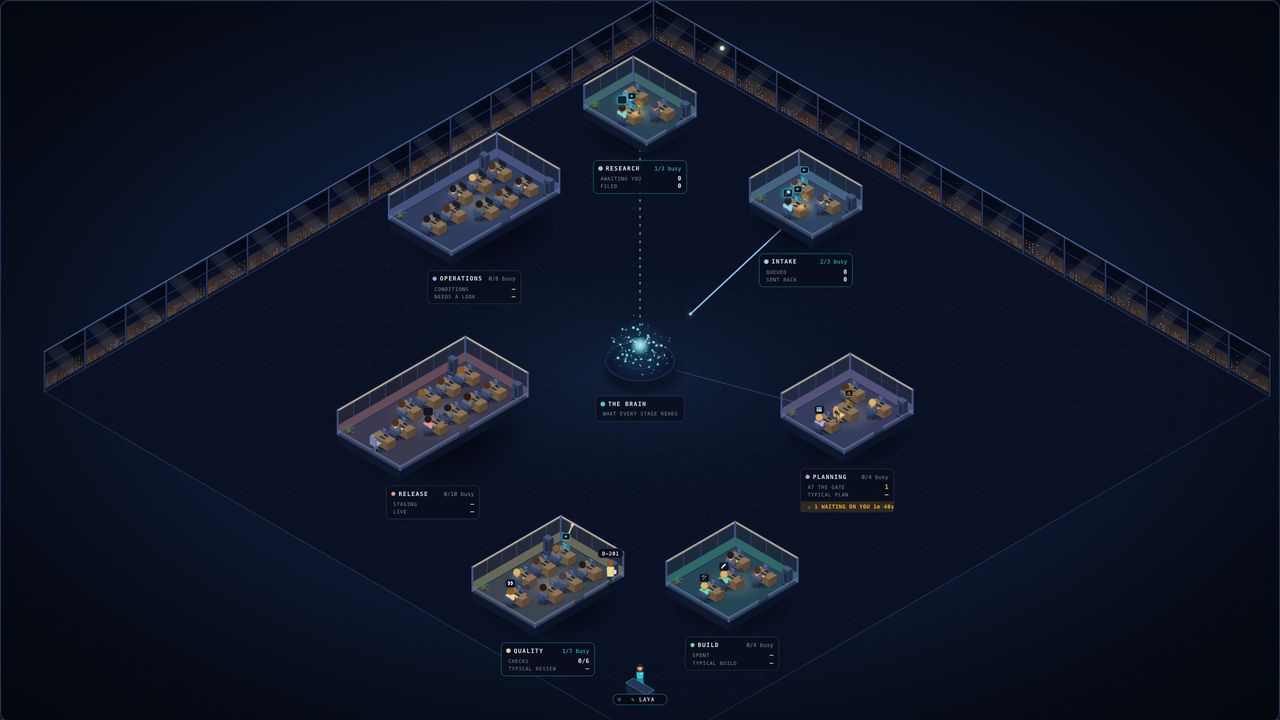
Bigger requests: the office splits each into tickets and runs them as one chain.
Change a banner's colour
These are the real figures of the matching task in our ledger.
Rewrite the terms of service
These are the real figures of the matching task in our ledger.
Restyle the store's announcement bar
These are the real figures of the matching task in our ledger.
Redefine the store's brand colours
These are the real figures of the matching task in our ledger.
A typical change
Nothing in our ledger matches it, so these are our typical figures: the median of 22 changes.
Summer sale
An estimate from our median change, $1.81 in AI usage and 31 minutes of work, times the changes this request splits into.
Loyalty programme
An estimate from our median change, $1.81 in AI usage and 31 minutes of work, times the changes this request splits into.
Found in search
An estimate from our median change, $1.81 in AI usage and 31 minutes of work, times the changes this request splits into.
Customer reviews
An estimate from our median change, $1.81 in AI usage and 31 minutes of work, times the changes this request splits into.
Floor 02 · The bottleneck
A new banner, a price change, a policy page, a reply to the same question again. None of it is hard. It waits because nobody else does it the way you would, so it waits for you.
An office of agents takes the work and brings you only the decisions.
Floor 03 · From your phone
You write what you want, in plain words. The office replies with what it is doing, asks when something needs you, and tells you when the change is live on a staging copy of your site.
It runs on Telegram today, or Zoho Cliq if your team lives there. You do not need to learn a dashboard.
Research: launch our summer sale. A landing page, a countdown banner, sale badges and an email to our customers.
🔬 On it. Reading your store's code; nothing is filed and nothing starts yet.
🔬 Four tickets drafted: ① The sale's landing page, in Arabic and English ② A countdown banner on the home page ③ A sale badge on every product in the sale ④ The sale email to customers who signed up File them? Nothing starts either way.
📥 File
📥 Filed as D-301 to D-304. Nothing starts until you say so.
▶️ Start them as one chain, and put each on staging when it's ready
📥 Queued as a chain: each ticket starts when the one before it is done. 🧭 Planning D-301, the landing page.
✅ D-301 is on staging: the landing page, in both languages. The checks passed and the review found nothing to block. 🛠 Now D-302, the countdown banner.
✅ D-302 is on staging: the countdown banner. 🛠 Now D-303, the sale badges.
✅ D-303 and D-304 are on staging: the sale badges and the sale email. All four are ready for you to test; production waits for your yes.
🚀 Ship to production
🚀 Live in production: the sale page, the countdown and the badges. The email waits for you to send it.
In this example File is tapped, so the conversation follows it.
Floor 04 · The departments
Each department does one job and hands the work to the next. You can watch it happen.
Laya reads every message first and sends it to the right desk. Where no rule can tell, a small model on your own server decides one thing, question or idea, and never acts.
Turns an idea you describe into clear tickets. Filing them starts nothing.
Reads each request and sends back the ones too thin to build.
Writes the plan, and shows it to you first when it touches anything sensitive, like payments or sign-in.
Writes the change in small, committed steps.
Runs your project's own checks, then a second agent that never saw the plan reads the work cold.
Versions the change and puts it on a staging copy of your site. Production waits for you.
Keeps the machinery running and rings your phone when something needs you.
Watches the server the office runs on: CPU, memory, disk and network on screen, and a warning before the disk or the AI usage runs out.
These are the departments every office starts with. Yours get the jobs your business needs, such as catalogue, customer replies or quotes, and each new one starts as a pilot.
Floor 05 · Automations
Not everything should wait for a request. Your office builds an automation once, you approve it, and from then on it runs every time, with nobody asking.
Your store
Inbox
Add a product, and the email it sends appears here.
Your store
Light enough for the hottest days and cut a little loose. It comes in sand, in every size, and it is in the shop now.
See the shirtYour store
Woven by hand, with a wide brim and a cotton band inside. It folds into a bag, and it is in the shop now.
See the hatYour store
Soft leather straps on a cushioned sole, made to be worn all summer. In tan, in every size, from today.
See the sandalsFloor 06 · Receipts
Every change the office makes leaves a receipt: what it was, what it cost in AI usage, and how long the office worked on it.
22 changes in 4 weeks. A typical one cost $1.81 in AI usage, from $0.14 to $6.53, and took about 31 minutes of work.
It also says no: 10 requests went back as too thin, and the review blocked work 7 times.
| Task | AI cost | Working time |
|---|---|---|
| Rewrite the privacy policy | $3.78 | 30 minutes |
| Rewrite the terms of service | $2.78 | 31 minutes |
| Restyle the store's announcement bar | $4.05 | 21 minutes |
| Redefine the store's brand colours | $6.53 | 56 minutes |
| Change a banner's colour | $1.12 | 22 minutes |
| Re-add a welcome bar removed on purpose cancelled | $0.03 | under a minute |
| Total | $18.29 | 161 minutes |
One cancellation is here on purpose. It cost $0.03 and was stopped before anything was built.
Figures from our pipeline's own records, read on 10 Oct 2026. AI cost is measured at the provider's list prices.
Floor 07 · Control
In your office, you choose what waits for you:
Every step is written down, and the record cannot be edited afterwards.
The agents work in locked boxes that can reach only the AI provider.
Floor 08 · Offers
Free
A 30-minute call in Arabic or English, then a one-page map of where agents fit in your business, within 48 hours.
Fixed price, agreed before we start
One workflow live in 10 working days. If it isn't live, you get your money back.
Fixed quote after the teardown
One workflow or agent, one chat channel, two approval gates.
Fixed quote after the teardown
Three to five workflows, or the full research-to-release pipeline for your site or store, with the office view and a monthly review.
Fixed quote after the teardown
Your whole business: custom integrations, a service agreement, Arabic and English.
It runs on a server in your name, with your code and your accounts. If we part ways, you keep all of it.
Floor 09 · How we start
Floor 10 · Questions
No. You write what you want in a chat, in plain words. The office replies the same way, and it asks you before anything goes live.
The office is built to catch that before you see it. It sends thin requests back, runs your project's own checks, and has a second agent that never saw the plan review the work cold. Nothing reaches production without three steps from you, and a staging deploy that fails its checks rolls itself back.
Every task starts with your tap. A plan that touches payments, sign-in or your data stops for your yes. Production takes three steps from you, and the last one names the exact version.
Your office runs on a server in your name. The agents work in locked boxes that can reach only the AI provider, and every step is recorded in a log that cannot be edited afterwards. Our "How we use AI" page lists every service that touches your data.
The agents run Claude Code, from Anthropic. We choose the model for each job, and the office records which model did every piece of work.
A fixed price, quoted after the free teardown, once we know which desks you need. For scale: a typical change costs $1.81 in AI usage.
A pilot is one workflow, live in 10 working days. If it isn't live, you get your money back.
Today our receipts show website and software changes, the work our office runs every day. Departments for other work, such as customer replies, catalogue or weekly reports, are built for your business, and each starts as a pilot.
The call, the setup and the support are in Arabic or English. Your office takes requests in the language your team writes in, and we test that during the pilot.
Today the office takes requests on Telegram or Zoho Cliq. Connecting your office to a WhatsApp Business number is custom work we can scope in the teardown.
It changes what they do. Your team becomes the people who ask for work and approve it, and the office takes the repetitive part.
Your office runs on a server in your name, with your code and your accounts, so it keeps working without us and you keep all of it. Every contract includes a written exit plan.
Tell us what you would hand over first. We will show you what that office looks like.